
Table of contents
Computers have found their way into every part of our lives, and Cambridge exams are no exception. For years you’ve been able to take your Cambridge English exam on a computer instead of on paper, and since 2024 this option has its own name: Cambridge English Qualifications Digital.
If you’re wondering whether the digital exam is right for you, what the screen actually looks like, whether it’s easier or harder than paper or when you’ll get your results, you’re in the right place. In this guide I’ll explain everything, with real screenshots of the digital exam and my experience as an exam trainer and as a Cambridge Digital Test Supervisor. Let’s get started!
I know this exam from the inside: I started in 2013 as an invigilator for Cambridge exams on paper and on computer, became a supervisor in 2014 with Exams Andalucía (now Examia) and have worked with the Exams Granada exam centre since 2016. So everything I tell you here I’ve seen first-hand, from the other side of the desk. 🙂
What is the Cambridge computer-based exam (Cambridge English Qualifications Digital)?
A Cambridge computer-based exam is exactly the same exam as the paper one, but instead of reading the questions in a booklet and writing your answers by hand, you use a computer: a screen, a mouse, a keyboard and headphones.
For years Cambridge called this option computer-based (which is why you’ll still see people talking about the «FCE computer based» or the «CAE computer based»). In March 2024 it was relaunched under a new name, Cambridge English Qualifications Digital, with some important improvements: more dates, last-minute registration and much faster results. So if you’re looking for information about the computer-based exam, what exists today is the digital exam.
Which Cambridge exams can you take in digital format?
The digital format is available for all the main Cambridge English exams:
| Exam | Level | Available digitally? |
|---|---|---|
| A2 Key and A2 Key for Schools | A2 | ✅ |
| B1 Preliminary and B1 Preliminary for Schools | B1 | ✅ |
| B2 First and B2 First for Schools | B2 | ✅ |
| C1 Advanced | C1 | ✅ |
| C2 Proficiency | C2 | ✅ |
Cambridge also offers some of its exams for children (Pre A1 Starters and A1 Movers) in digital format, although in this guide I focus on the A2 to C2 exams.
Bear in mind that in the digital format only Reading (and Use of English at B2, C1 and C2), Writing and Listening are taken on the computer. Speaking is still face to face, exactly as in the paper exam: with two examiners, one who asks you the questions and one who listens, alongside one or two other candidates. And honestly, I think that’s the right decision: talking to another person is far more realistic than talking to a microphone.
Is it the same exam? Is it easier on a computer?
This is the question my students ask me most, and the answer is clear: the digital exam is exactly the same as the paper one. It has the same parts, the same number of questions, the same task types, the same timing and the same level of difficulty. And, most importantly, you get the same qualification.
For example, if the paper-based B2 First (FCE) has 7 Reading and Use of English parts with 52 questions, the digital one has exactly the same. So no, it isn’t easier or harder: it would be very unfair if one format were.
The only difference in content is that, in the digital format, each candidate gets a random set of questions, all equivalent in task type and difficulty. In other words, the person next to you won’t necessarily have the same exam as you, which greatly reduces the risk of copying.
Paper vs digital Cambridge exams: the differences
Although the qualification is the same, quite a lot changes in how you take the exam, the dates and the timings. Here’s a comparison using Cambridge’s official information:
| Paper | Digital | |
|---|---|---|
| Dates | Fixed sessions | Up to 365 days a year (depending on the centre) |
| Registration | Up to about 4 weeks before | Up to 2 working days before |
| Reading and Writing | Booklet, pen and pencil | Computer with screen, keyboard and mouse |
| Listening | Speakers in the room | Headphones with volume control |
| Questions | The same for everyone | Randomly allocated to each candidate |
| Speaking | Face to face, with two examiners and another candidate | |
| Results | 4–6 weeks | 5–10 working days |
| Certificate | 7–10 weeks after the exam | 3–4 weeks after the exam |
A word of warning about dates: the fact that the digital format can be offered «365 days a year» doesn’t mean your centre has an exam every day. Each exam centre publishes its own sessions, so check with yours.
What the digital exam looks like: Reading, Writing and Listening
Let’s get practical. I’ll show you what the exam screen looks like with screenshots from Cambridge’s B2 First digital sample test. The interface is the same at every level.
What you’ll see in every paper
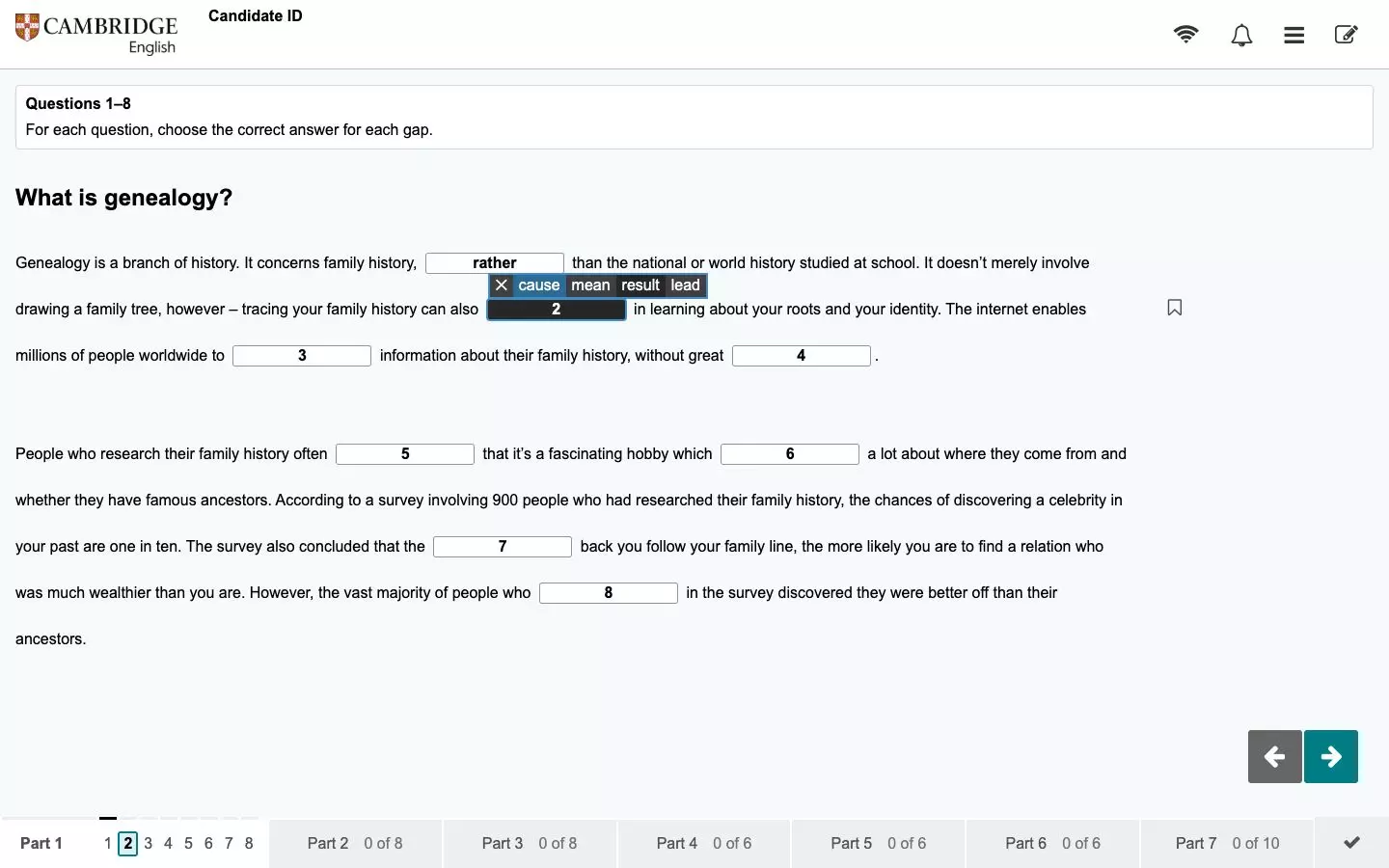
- Navigation by parts and questions: the bar at the bottom shows every part and how many questions you’ve answered in each (0 of 8, 3 of 8…). You can move freely between them and go back to any question before the test ends.
- Unanswered questions: above each question number there’s a grey line that turns black when you answer it, so you can see at a glance what’s left.
- Flagging questions: the bookmark icon lets you flag questions you want to come back to.
- Timer: at the top you’ll see how much time you have left. With 5 minutes to go it also starts showing seconds, and in the last minute it turns red.
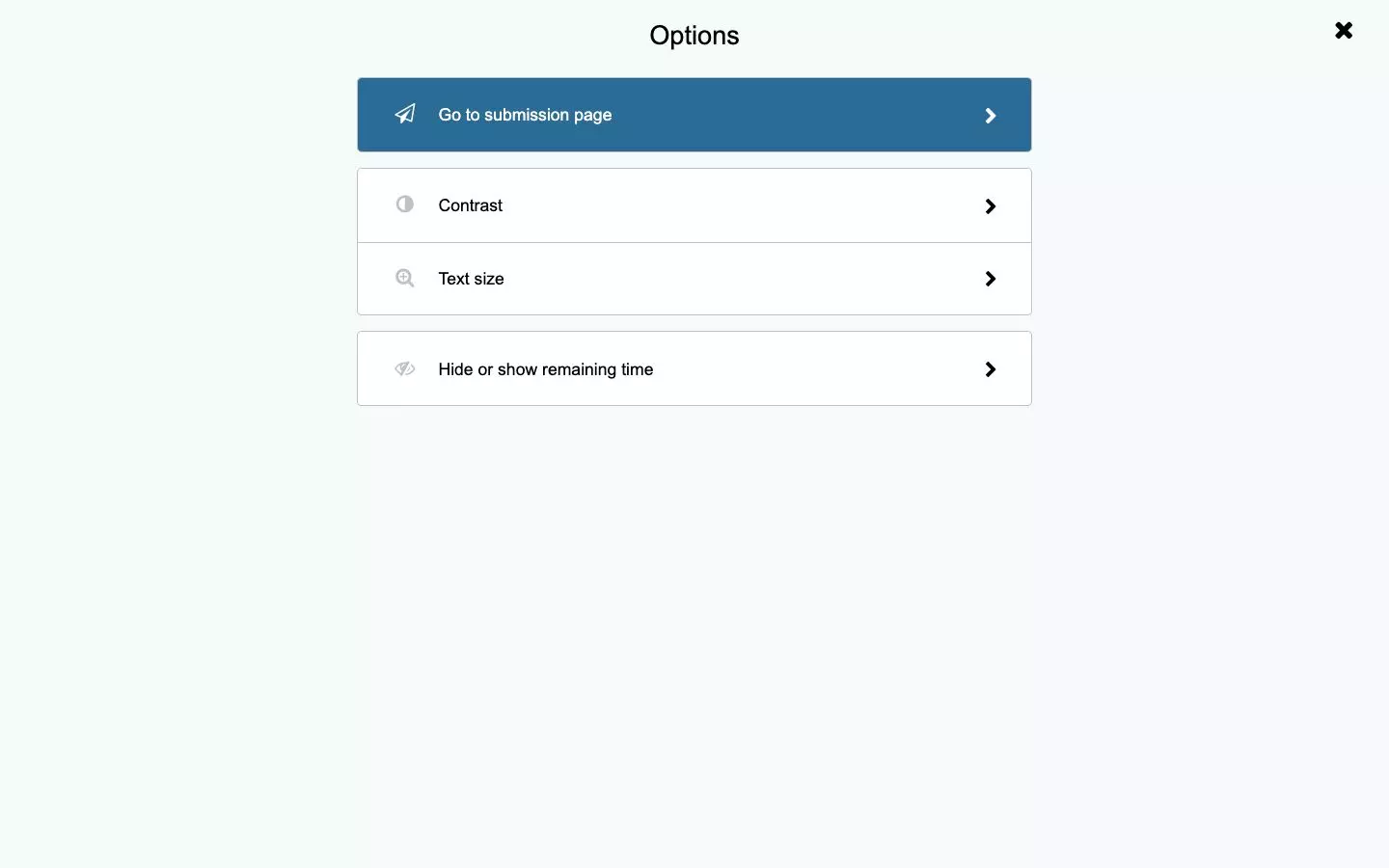
- Display options: from the menu you can change the contrast and the text size, and hide or show the remaining time.
- No internet: the exam computer has no internet access, so forget about looking up words.
Reading and Use of English on screen
In gap-fill parts, such as B2 First Use of English Part 1, you click on the gap and choose an option from a small menu. In parts where you have to write the word, you simply type it into the gap.
In long texts, such as B2 First Reading Part 5, the screen splits in two: the text on the left and the questions on the right, and you can resize each side. You can also highlight and make notes: select the text, right-click and choose the option.
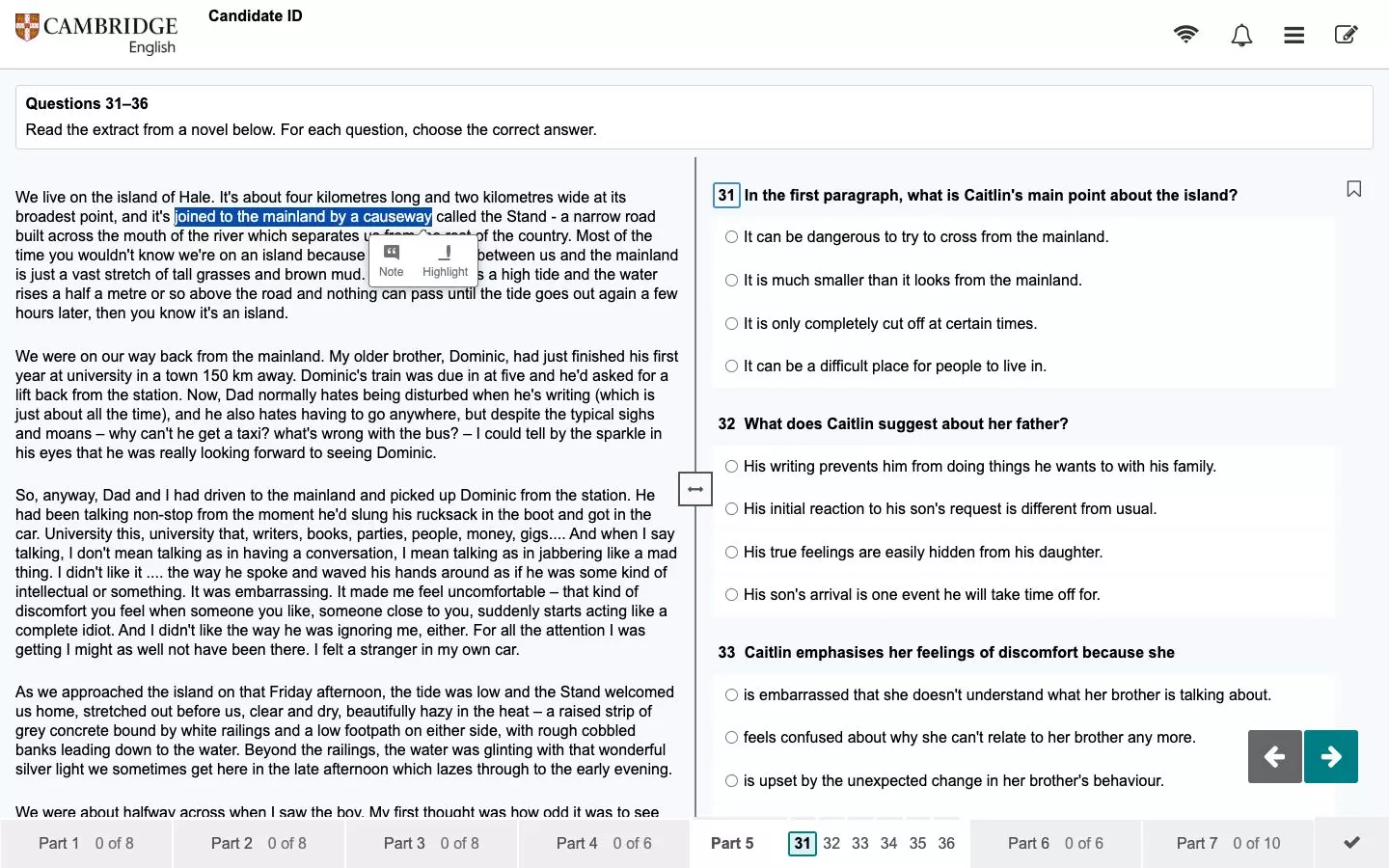
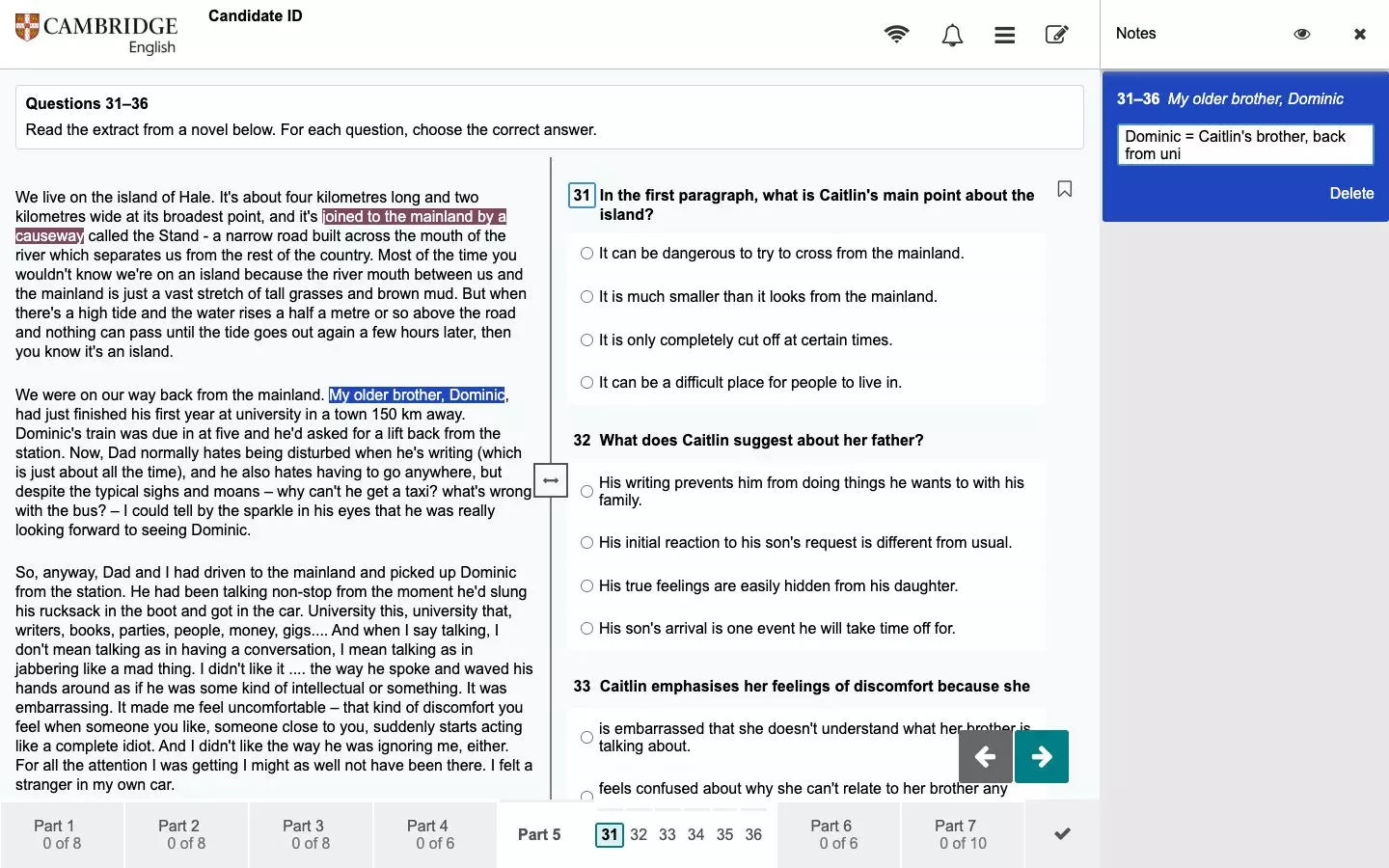
It’s very handy, although if you’re the kind of person who fills the text with arrows, circles and notes in the margin, you’ll find paper gives you more freedom. To make up for it, you’ll be given blank paper for your notes.
Writing on screen
For me, Writing is the main reason to choose the digital format. You type in a text box and can delete, edit, copy and paste as much as you like, with no crossings-out or handwritten drafts. And best of all, there’s an automatic word count under the box, so you don’t have to count your words.
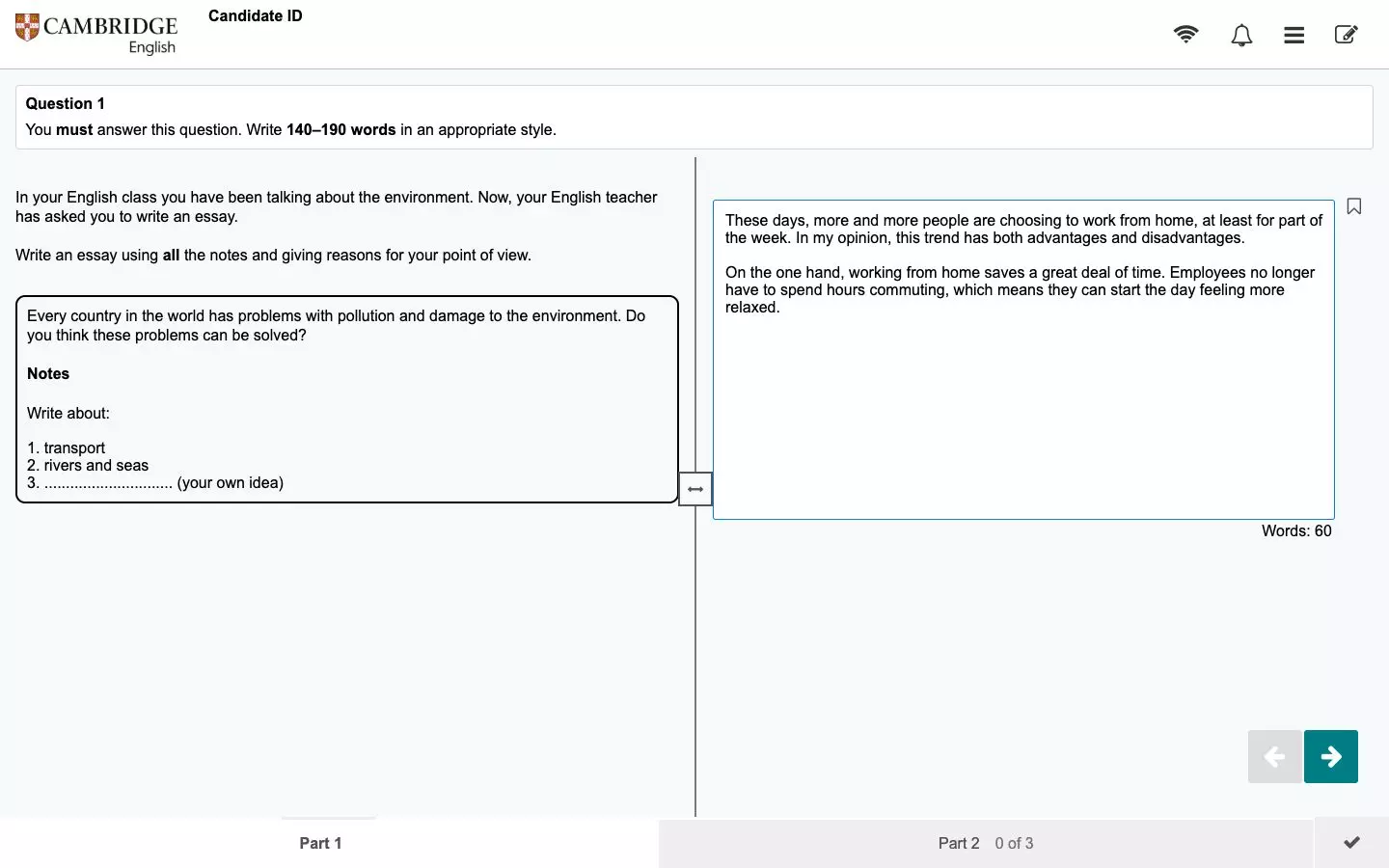
One word of warning: there’s no spellchecker. Always check your text before time runs out. And for planning, you can use the sheets of paper the centre gives you.
Listening on screen
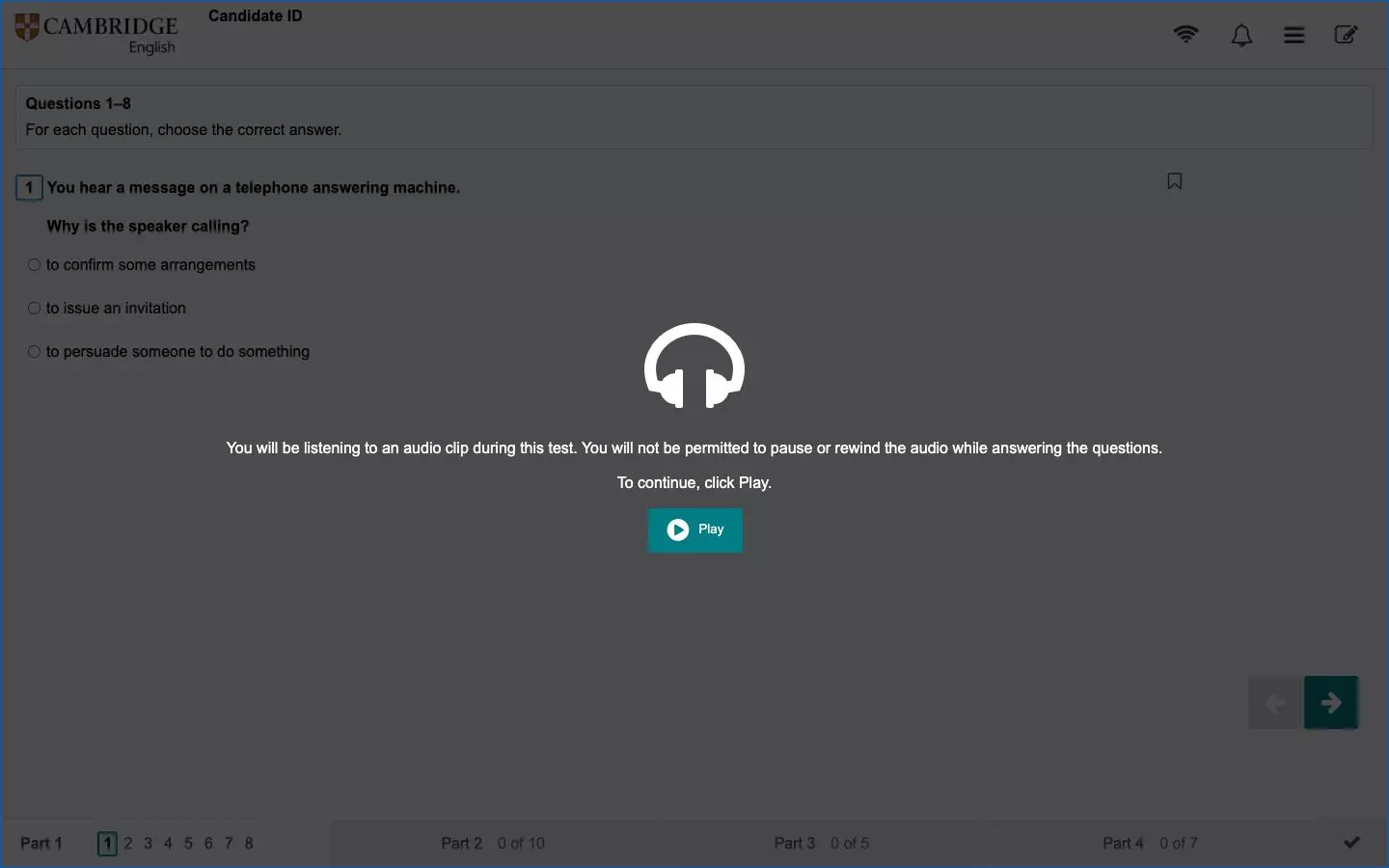
In Listening you wear headphones and can adjust the volume at any time. No more problems with sitting too far from the speaker or the audio echoing around the room. As on paper, you hear each recording twice and can’t pause it, and at the end you have 2 minutes to check your answers.
How Writing is marked in the digital exam
This is one of the most important changes, and hardly anyone talks about it. In the digital format, Cambridge uses hybrid marking for Writing: an automated marking system works alongside human examiners.
- Each exam has its own automarker, trained on tens of thousands of responses marked by certified Cambridge examiners.
- It marks using the same criteria as an examiner: Content, Communicative Achievement, Organisation and Language.
- Automated scores go through quality checks, and uncertain or unusual responses are reviewed by a person. Human examiners also mark a percentage of randomly selected responses.
- According to Cambridge’s most recent guide, it applies to A2, B1, B2 and C1 digital exams. C2 Proficiency Writing and all paper-based exams are still marked by human examiners only.
Does this change anything for you? No. You prepare in exactly the same way and write for the reader stated in the task. What changes is that results come sooner. And if you think your result isn’t fair, the enquiry process is the same: contact your exam centre.
Digital exam results and certificate
Here’s the big advantage of the digital format. Because your answers are uploaded instantly and part of the marking is automated:
- You get your results in 5–10 working days, compared with 4–6 weeks for the paper exam.
- The paper certificate usually reaches your exam centre about 3–4 weeks after the exam, compared with 7–10 weeks for paper.
If you need your certificate in a hurry (for a university application, a job or a public exam), the digital format is undoubtedly your best option.
Pros and cons of the digital exam
Here’s my opinion after years of preparing students for both formats.
Pros
- Much faster results and more flexible dates and registration.
- More comfortable Writing: you edit without crossings-out and have a word count.
- Listening with headphones and adjustable volume.
- Useful tools in Reading: highlighting, notes and flagging questions.
- No need to transfer your answers to a separate answer sheet, as on paper.
Cons
- Technical problems: you depend on the centre’s computer, software and connection. They can happen, but as a supervisor I can tell you they’re very rare and can always be solved, because your answers are saved regularly throughout the exam: if something fails, you don’t lose any of them. What’s more, the system used for the last couple of years has improved enormously in this respect.
- Reading on screen is more tiring for some people, especially with the long texts at C1 and C2.
- Less freedom to annotate the text than on paper.
- If you write much faster by hand than on a keyboard, Writing may work against you.
But don’t just take my word for it. My sister Laura recently took C2 Proficiency in digital format to earn points towards her teaching post at an Official School of Languages (EOI), and this is what she told me:
«Taking C2 Proficiency on a computer was a real success. In my opinion, every part is better done digitally, even Reading, where being able to highlight the text and move the paragraphs to see them within the text was a great help. And in Writing, being able to type and correct at the same time is a real relief, without having to worry so much about possible mistakes. Everything went like clockwork.»
Laura, C2 Proficiency digital candidate
My recommendation: if you’re comfortable with a keyboard and a computer, go for the digital format. It’s the same qualification, with results much sooner and a far more comfortable Writing paper. If you prefer writing by hand or find reading on screen hard, paper is still a perfectly good option.
How to prepare for the Cambridge digital exam
The good news is that you don’t need to change the way you study: the exam tests the same things. But I do recommend getting familiar with the interface before exam day, so nothing takes you by surprise.
Official digital sample tests
Cambridge offers a free digital sample test and a video tutorial for each level. You’ll find them on each exam’s preparation page:
| Exam | Digital sample test and tutorial |
|---|---|
| A2 Key / for Schools | A2 Key preparation |
| B1 Preliminary / for Schools | B1 Preliminary preparation |
| B2 First / for Schools | B2 First preparation |
| C1 Advanced | C1 Advanced preparation |
| C2 Proficiency | C2 Proficiency preparation |
If you’re taking B2 First, here are the digital sample tests for each paper: Reading and Use of English, Writing and Listening.
Bear in mind that the sample tests differ slightly from the live exam: they don’t mark themselves (you have to use the answer key as you go), highlighting isn’t saved and there’s a «start over» button that doesn’t exist in the real exam.
Other official resources
- Test & Train: short, mobile-friendly exam practice tasks with instant feedback.
- Authentic Digital Practice Tests: full digital mock tests (paid), auto-marked in under five minutes (except Speaking and C2 Writing), with up to three attempts and a CEFR report on your level.
My tips for digital exam day
- Practise typing against the clock. If you always write your essays by hand, do the last few on the computer, timing yourself. Typing quickly and accurately can be trained too.
- Get used to reading on screen. Read long articles on the computer and practise highlighting and making digital notes.
- Do the sample test for your level at least once, so you know where every button is.
- Use the paper you’re given to plan your Writing and for notes in Listening.
- Check your spelling before you finish, because there’s no spellchecker.
And if you’d like to know what to bring and how the whole day works, I explain it in my post on Cambridge exam day.
Official video: what the Cambridge digital exam is like
In this video from Cambridge English you can see what the digital exam experience is like:
Where to take the digital exam, registration and price
The digital exam is always taken at an authorised exam centre (or at a school or venue agreed with it), never at home. The centre provides the computers (PC, laptop or Mac) and the headphones.
To register, contact an exam centre: they’ll tell you which digital dates they offer and help you enrol, which for the digital exam can close just 2 working days before the exam. Each centre also sets its own price, so it’s best to ask them directly. In my list of Cambridge exam centres in Spain you’ll find every centre with its contact details.
Frequently asked questions about the Cambridge digital exam
Can I take the Cambridge exam from home?
No. The digital exam is taken at an exam centre, at your school or at another venue agreed with the centre, never at home.
Does the certificate say I took the exam on a computer?
It’s the same Cambridge English qualification, whether you take it on paper or digitally. The difference lies in how you take the exam and the timings, not in the qualification you get.
Can I go back to a question I’ve left unanswered?
Yes. You can review and change your answers at any time before the test ends.
Is there a spellchecker in Writing?
No. There’s a word count and you can edit your text, but there’s no spellchecker, so check carefully before you finish.
Can I bring a pen and paper?
You can bring a pen or pencil, and the centre will give you paper for your notes. When you finish, you’ll have to leave it on the desk.
What happens if the computer fails during the exam?
Raise your hand straight away and the supervisor will deal with it. Technical problems are very rare and, because your answers are saved regularly throughout the exam, you don’t lose any of them.
When do digital exam results come out?
Between 5 and 10 working days after the exam, compared with 4–6 weeks for the paper exam.
Conclusion
The Cambridge computer-based exam, now Cambridge English Qualifications Digital, is the same exam, with the same difficulty and the same qualification as on paper, but with more dates, last-minute registration, results in under two weeks and tools that make Writing and Listening much more comfortable. If you’re comfortable with a computer, for me it’s the best option.
Have you decided which format you prefer? Tell me in the comments and, if you have any questions, ask me anything. And don’t forget to share this post with anyone preparing for a Cambridge exam.
See you in the next post. Until then, don’t forget to keep smiling! 🙂
